Connect a Custom Domain
By default your site runs on a Brixi address. This page walks you through swapping that for your own domain, so your main site and landing pages load on an address visitors recognise as yours.
Entry pointSites → Domains
Before You Start
- You need permission to edit Sites.
- Have the domain you want to use and access to its DNS settings.
- Know whether the domain should point to your main site, your landing pages, or both.
- DNS changes can take a while to propagate, so don't leave this until launch day.
Connect a Domain
The Primary Domains list shows each connected domain, which site or landing page it points to, and its status (for example, Verification Pending). Use the Actions menu on a row to manage a domain.
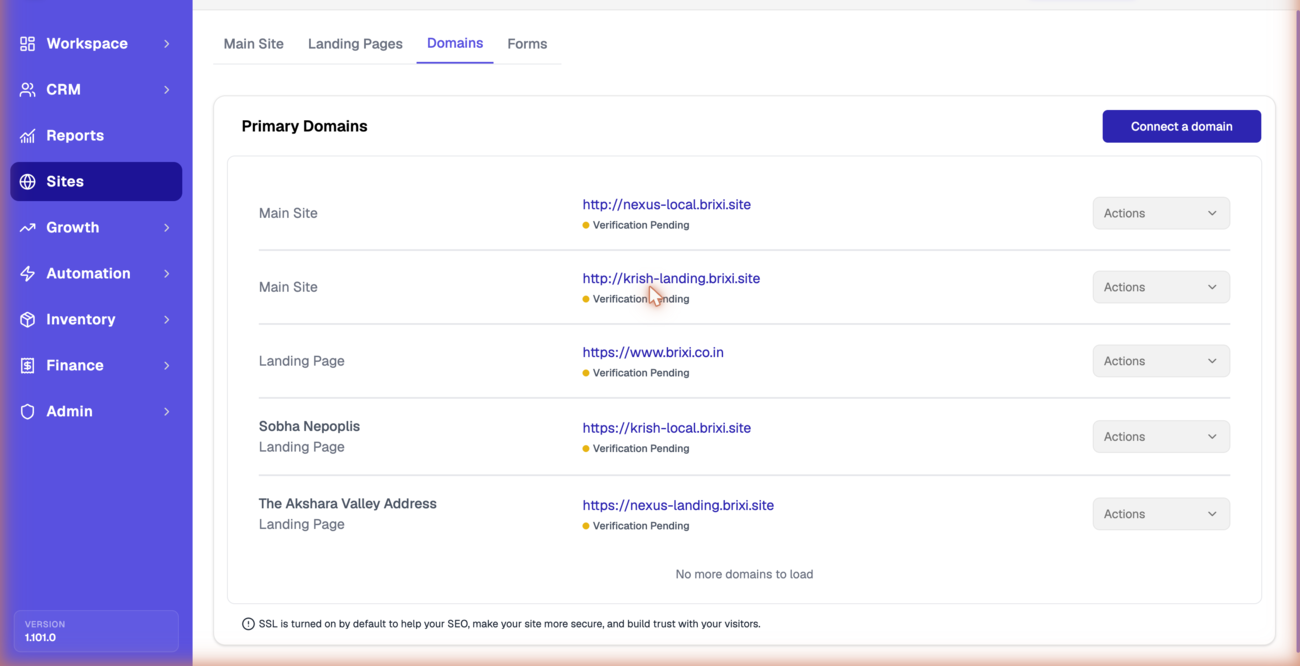
- Open Sites → Domains and select Connect a domain.
- Enter the domain you want to connect and which site or landing page it serves.
- Update your domain's DNS records as instructed so it points to your Brixi site.
- Wait for the status to change from Verification Pending to verified.
- Confirm your site loads on the new domain.
You can also start a domain change from the main site using Edit Domain. See Configure Your Main Site.
DNS changes are not always instant. If the domain does not work right away, wait and check again before changing settings.
Check the Result
After connecting, you should see:
- The domain listed under Sites → Domains.
- Your main site and landing pages loading on the domain.
Reporting Impact
The domain your pages use affects how website leads are attributed. A correctly connected domain keeps website lead source reporting consistent.
Common Issues
| Issue | What to check |
|---|---|
| Domains list fails to load | Select Try again; if it continues, contact support |
| Domain does not resolve | Recheck the DNS records and allow time to propagate |
| Site still uses the old address | Confirm the domain is connected and verified |
| Cannot add a domain | Confirm your role can edit Sites |
| Status stuck on Verification Pending after DNS is right and propagation has passed | See Getting Help — include the domain name and a screenshot of your DNS records. |