See Where Your Leads Come From
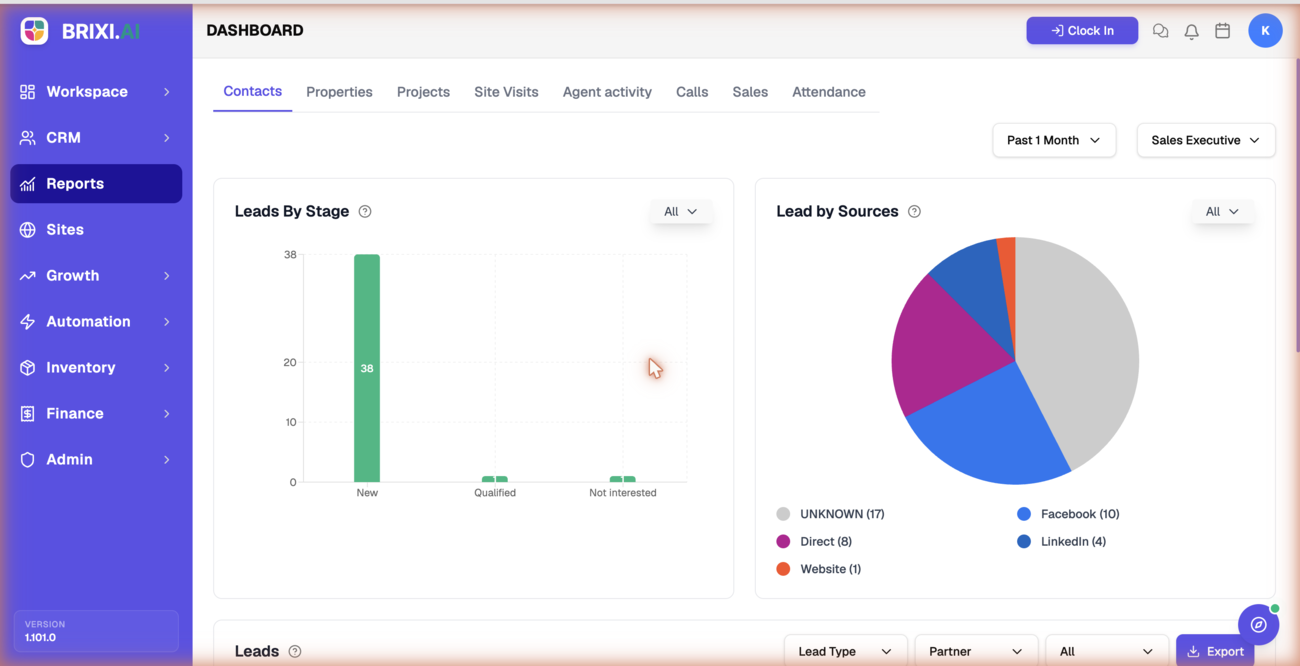
Which channels actually bring in leads, and where do those leads end up? This report breaks your leads down by stage and by source, so you can double down on what converts and stop spending on what doesn't.
Entry pointReports → Contacts
| Article summary | Details |
|---|---|
| Best for | Managers tracking lead flow and source quality |
| Main outcome | A clear read on stage distribution and top lead sources |
| Roles | Manager, admin |
| Requires | Permission to view Reports; leads with stages and sources set |
| Related reports | Agent Activity, Sales |
What It Shows
| Section | What it tells you |
|---|---|
| Leads By Stage | How many leads are New, Qualified, Not interested, and so on |
| Lead by Sources | A breakdown of where leads came from (for example, Facebook, Direct, LinkedIn, Website, or Unknown) |
| Leads table | The underlying leads, filterable by lead type and other fields |
Before You Start
- Set the period and, if needed, the Sales Executive filter.
- Make sure leads have a stage and source set, or they fall into Unknown.
How To Read It
- Open Reports → Contacts.
- Use the period and Sales Executive filters at the top.
- Read Leads By Stage to see where leads sit in the pipeline.
- Read Lead by Sources to see which channels perform best.
- Scroll to the Leads table and apply its filters to inspect specific segments.
Common Issues
| Issue | What to check |
|---|---|
| Many leads show as Unknown source | Confirm leads are tagged with a source on capture |
| Stage counts look off | Confirm leads are moved through stages consistently |
| A teammate's leads are missing | Adjust the Sales Executive filter |
A hidden Contacts tab means your role doesn't include reporting — your admin can fix that. A big Unknown slice in the sources chart isn't a bug either; it means leads are being captured without a source, which is a team habit to fix, not a ticket.
Raise it with Brixi support only when stage or source counts contradict the leads themselves. Send the period, the filters, and a screenshot.
Reporting Impact
Everything here rests on capture hygiene. If leads come in without a source or sit in the wrong stage, the ROI and conversion picture drifts from reality.