Measure Calling Effort and Outcomes
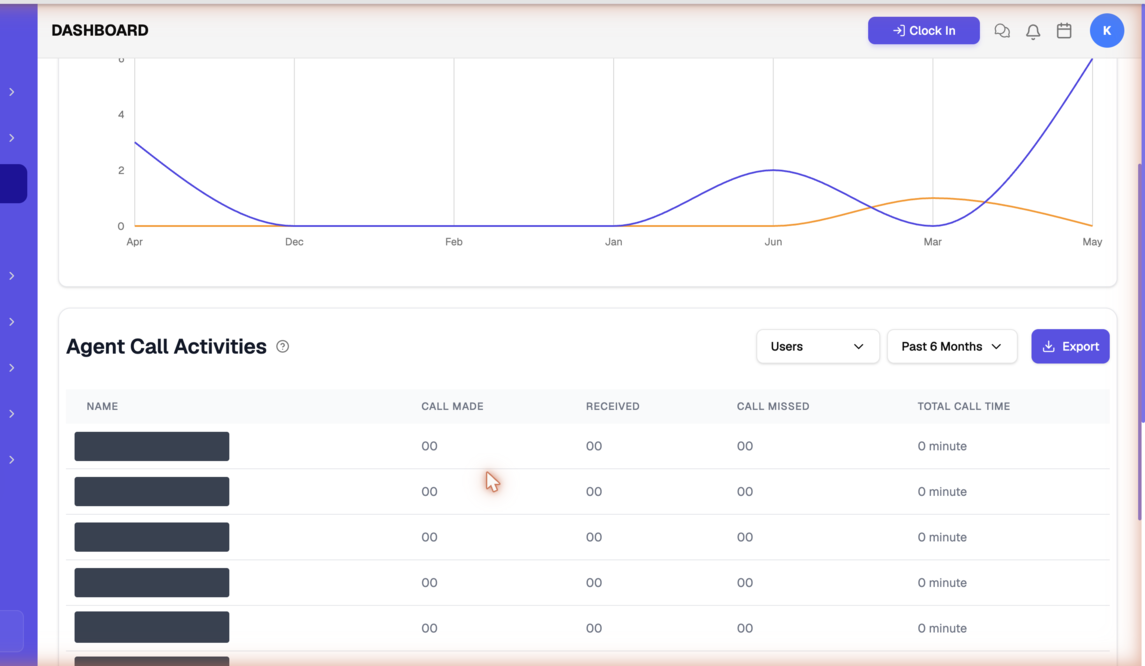
How often is your team actually picking up the phone? This report shows calls made and received over time, plus each agent's call volume, missed calls, and talk time — handy for spotting where calling discipline is slipping.
Entry pointReports → Calls
| Article summary | Details |
|---|---|
| Best for | Managers tracking calling effort and outcomes |
| Main outcome | A read on call volume and per-agent call activity |
| Roles | Manager, admin |
| Requires | Permission to view Reports; calls logged or placed through Brixi |
| Related reports | Agent Activity, Telecalling Reports |
What It Shows
| Section | What it tells you |
|---|---|
| Calls chart | Calls Made and Calls Received over the selected period |
| Agent Call Activities table | Per-agent rows with Call Made, Received, Call Missed, and Total Call Time |
Before You Start
Pick the period and, if you're reviewing one person, set the Users filter before reading the chart.
How To Read It
- Open Reports → Calls.
- Read the Calls chart to compare calls made versus received.
- Scroll to Agent Call Activities to see per-agent volume, missed calls, and total talk time.
- Use Export to download the call data.
Common Issues
| Issue | What to check |
|---|---|
| Call counts are low | Confirm calls are placed or logged through Brixi and widen the period |
| Total call time is zero | Confirm the dialer is connected and calls are tracked |
Your admin owns two of the likely problems here: the Calls tab being hidden (role access) and the dialer not being connected, which shows up as zero talk time across the board.
If the dialer is connected and call totals still disagree with the dialer's own logs, contact Brixi support with the period, the Users filter, and a screenshot.
Reporting Impact
Only calls placed through Brixi or logged in it are counted. Calls made off the dialer and never logged simply don't exist as far as this report is concerned.