See How Active Each Agent Is
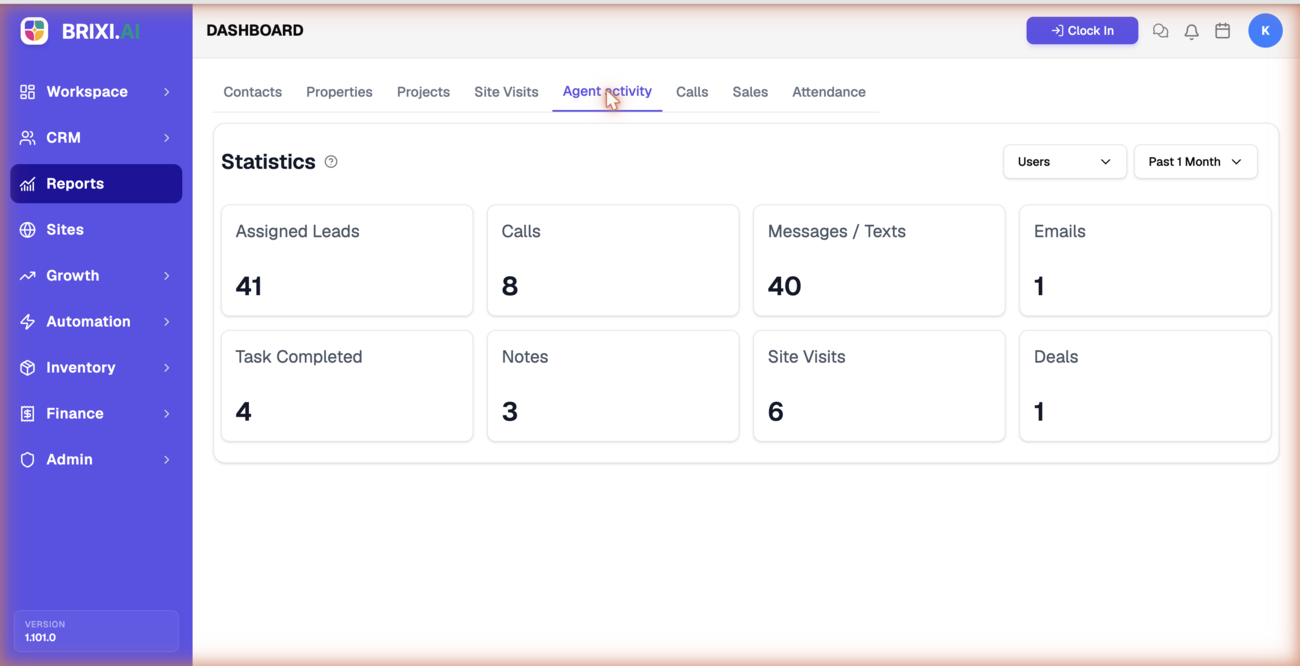
Who's putting in the work, and who needs a nudge? This report rolls each agent's leads, calls, messages, emails, tasks, notes, site visits, and deals into one per-agent view, so you can coach fairly and balance workload across the team.
Entry pointReports → Agent activity
| Article summary | Details |
|---|---|
| Best for | Managers reviewing team workload and productivity |
| Main outcome | A per-agent read on activity and output |
| Roles | Manager, admin |
| Requires | Permission to view Reports |
| Related reports | Calls, Site Visits, Sales |
What It Shows
| Section | What it tells you |
|---|---|
| Statistics | Totals for Assigned Leads, Calls, Messages / Texts, Emails, Task Completed, Notes, Site Visits, and Deals |
| Agent Engagements table | Per-agent rows with Deals, Calls, Call Minutes, Messages, Site Visits, Assigned Leads, and Tasks Completed |
Before You Start
Set the period first, then use the Users filter to look at one person or keep the whole team in view.
How To Read It
- Open Reports → Agent activity.
- Read the Statistics cards for team or per-user totals.
- Scroll to Agent Engagements to compare agents across activity types.
- Use Export to download the engagement data.
Common Issues
| Issue | What to check |
|---|---|
| An agent shows zero activity | Confirm work is logged (calls, notes, tasks) and the period is right |
| A teammate is missing | Adjust the Users filter |
Before escalating a zero, remember it usually means unlogged work, not a broken report. If the Agent activity tab itself is hidden, your admin controls that access.
Contact Brixi support only when an agent's totals clearly disagree with work you can see logged on their records. Include the period, the Users filter, and a screenshot.
Reporting Impact
The report counts logged activity, nothing else. An agent who works hard but doesn't log calls, notes, or tasks will look idle here — so the logging habit matters as much as the work itself.