Bring Meta Ad Spend and Lead Forms into Brixi
Bring your Facebook and Instagram ad accounts into Brixi so ad spend, audiences, and lead-form data flow into your reporting and CRM. The connection runs through Facebook's standard OAuth flow: sign in once, approve Brixi's access, then pick exactly which ad accounts Brixi should pull data from.
Entry pointAds → Connections
| Article summary | Details |
|---|---|
| Requires | A Facebook account with admin access to the Meta ad accounts you want to connect. |
| Where to go | Ads → Connections → + Connect an ad account → Meta (Facebook / Instagram). |
Who Can Do This
- Account admins and marketing admins connect Meta ad accounts.
- The connecting Facebook user must have admin access to each Meta Business Manager / ad account they want to link.
- Sales managers review lead-form data after the accounts are linked; sales users work the leads from CRM → Contacts.
What You Need
- A Facebook account that has admin access to the Meta ad accounts you want to link.
- The list of ad accounts (and their ad-account IDs, optional) you plan to connect.
- A modern browser with pop-ups allowed for
brixi.aiso the Facebook consent window opens cleanly.
Connect from the Facebook user that already manages your ad accounts in Meta Business Manager. Brixi binds the linked ad accounts to that user — if that user later loses access in Meta, the connection will need to be re-authorised by someone who still has it.
Connect Meta
- Open Ads → Connections. Select + Connect an ad account (top-right). A Connect an ad account dialog opens.
- In the dialog, select Connect next to Meta (Facebook / Instagram) — Ads spend, lead forms, campaign performance.
- Sign in to Facebook in the popup if you're not already signed in. On the Reconnect screen, confirm you're using the correct account (use Log into another account if not) and select Continue as <you>.
- Brixi briefly shows Installing Meta (Facebook / Instagram)… while it authorises the connection.
- The Pick Meta ad accounts dialog appears with every ad account the connecting Facebook user can access. Tick the ad accounts you want Brixi to pull from (or use Select all) and select Confirm (N).
- A Meta (Facebook / Instagram) connected toast appears with N ad account(s) linked, and the linked accounts now show on the Connections page with a Connected status and a Revoke action.
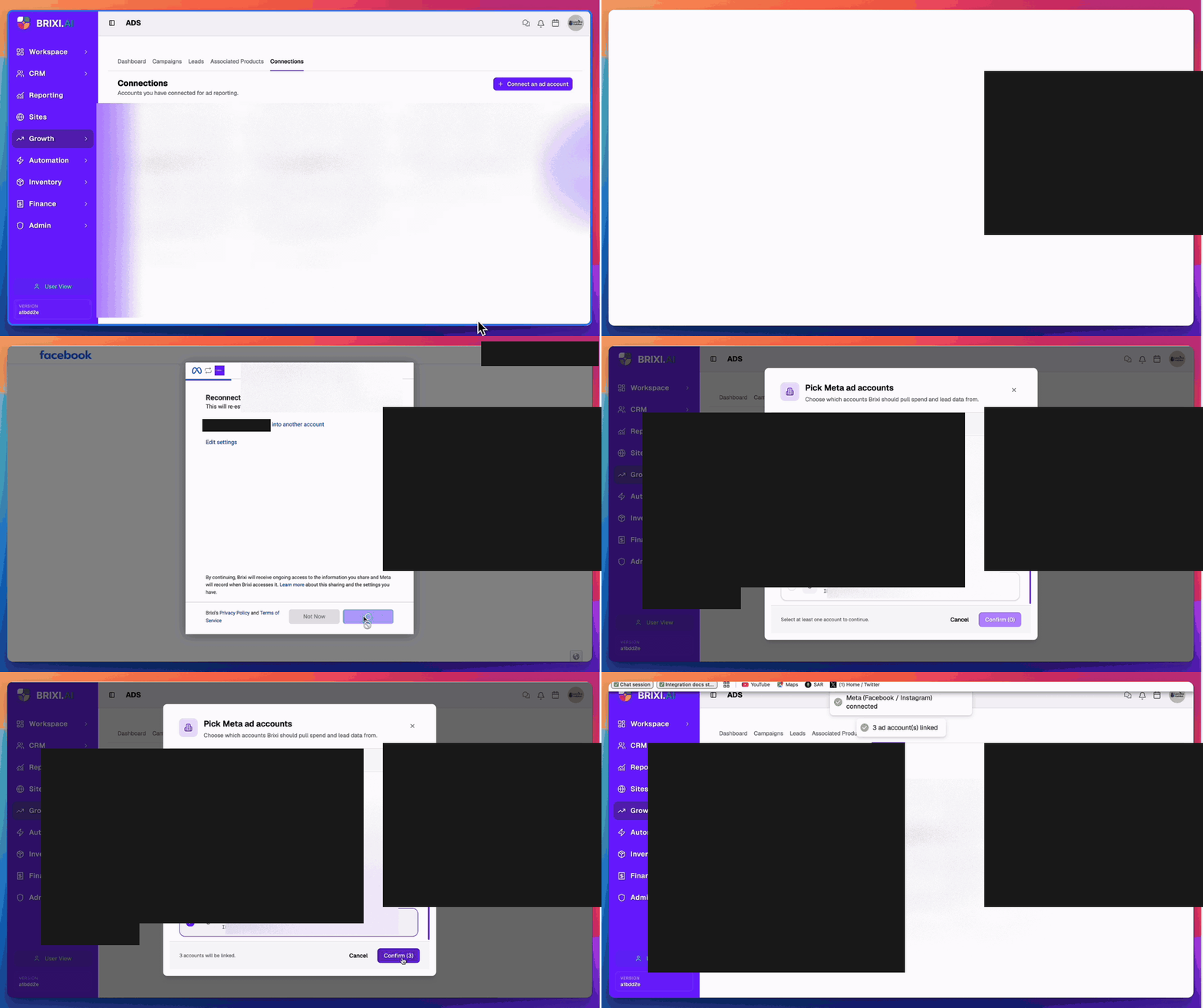
Brixi only writes the linked ad accounts once the Pick Meta ad accounts step completes. Closing the Facebook popup or reloading Brixi before the toast appears means you'll need to re-run the flow from step 1.
Permissions You'll Grant
When you authorise Brixi in Facebook, approve all of the requested access — Meta will only grant Brixi the scopes you tick, and ad-spend and lead-form sync need all of them.
| Permission group | Why Brixi needs it |
|---|---|
| Read ads, campaigns, and insights | Pull spend, impressions, clicks, and campaign-level performance into Brixi reports. |
| Manage and read lead-gen forms | Sync new leads from Facebook / Instagram lead forms into CRM → Contacts in seconds. |
| Read Pages and Page-level insights | Tie lead-form leads to the right Page so source / campaign attribution is correct. |
| Read your business account info | Identify which Meta Business Manager owns the ad accounts so they land on the right linked record. |
Brixi never posts to your Pages, runs ads, or changes campaign settings. The grant is read-and-receive only.
What Syncs After Connecting
Once one or more ad accounts are linked, Brixi will:
- Pull ad-spend, impressions, clicks, and conversions from every linked ad account into the Ads → Dashboard and Campaigns views.
- Receive new lead-form submissions from Facebook / Instagram lead-gen forms in seconds and create them as contacts with Meta (and the specific campaign / form) as the source.
- Match by email and phone so the same person filling multiple forms collapses to a single contact.
- Run assignment and follow-up workflows on each new Meta lead — owner routing, tasks, and reminders fire automatically.
- Show every linked ad account as a card under Ads → Connections with Connected status and a Revoke action.
Spend and lead data typically reaches Brixi within a minute of being recorded in Meta.
Disconnect or Revoke
You can stop pulling from a single ad account or disconnect the whole Meta integration:
- Revoke a single ad account — open Ads → Connections, find the ad account card, and select Revoke. Brixi stops pulling spend and lead-form data from that account immediately. Other linked accounts keep running.
- Disconnect Meta entirely — revoke every linked Meta ad-account card, or remove Brixi from the Facebook user's Business Integrations in Meta. The connection ends instantly across all accounts.
After disconnecting:
- Existing spend / campaign data already pulled stays in Brixi reports — it doesn't disappear with the disconnect.
- Lead-form leads already created stay on the matching contact with their original source attribution.
- Reconnecting later re-runs the OAuth + picker flow. Your previous mappings are restored if you authorise with the same Facebook user and re-tick the same ad accounts.
Common Issues
| Issue | What to check |
|---|---|
| Facebook popup didn't open | Allow pop-ups for brixi.ai in your browser, then select + Connect an ad account → Meta again. |
| Stuck on Facebook Reconnect screen | Use Log into another account if the current Facebook user isn't the right one, or Edit settings to expand the granted access. |
| The Pick Meta ad accounts dialog is empty | The Facebook user doesn't have access to any ad accounts in Meta Business Manager — sign in with a user who does, or get added to the Business Manager. |
| Confirm is disabled | At least one ad account must be ticked. Select all picks every available account. |
| The connection didn't save | Re-run the flow and let the Installing Meta… step finish without reloading or closing the Facebook tab. |
| Ad account card shows Revoked | The Facebook user lost access in Meta, or someone selected Revoke. Re-run the flow to re-link it. |
| Lead-form leads aren't arriving | Confirm Manage and read lead-gen forms was approved, and that the lead form is published and tied to a Page you own. |
| Spend numbers don't match Meta | Sync runs about every minute. Refresh after a couple of minutes; if it still differs, check that every ad account showing spend in Meta is linked in Brixi. |
| Toggle / + Connect an ad account missing | Ask your admin to review your access to Ads → Connections. |
If Ads → Connections or the + Connect an ad account button is missing, that's role access in Brixi — ask your admin. An empty Pick Meta ad accounts dialog, on the other hand, is a Meta problem: the Facebook user you signed in with doesn't have ad-account access in Business Manager, and someone on the Meta side needs to grant it.
Contact Brixi support if the flow completes — toast, Connected status and all — but spend or lead-form data never shows up. Include the ad-account ID, which permissions you approved, and roughly when you connected.