Pull Square Yards Leads into Brixi
To get Square Yards leads into Brixi, you give Square Yards a unique webhook URL generated for your account. Their team pushes every new lead and inquiry to it, and Brixi turns each one into a contact — no manual copying.
Entry pointAutomation → Integrations
Who Can Do This
An account admin or sales-ops user installs the connector and handles the exchange with Square Yards. Sales users take it from there with the contacts, assignments, and tasks that arrive.
What You Need Before Starting
- Admin access to Integrations in Brixi.
- A contact at Square Yards (your account manager) who can configure lead delivery.
- A decision on who should own or review new Square Yards leads.
Connect Square Yards
Go to Automation → Integrations and find the Square Yards card. The setup: install the connector, copy the webhook URL Brixi generates, pass it to Square Yards.
Step 1 — Install Square Yards
On the Integrations page, search for Square Yards and turn on the toggle on its card. Brixi installs the connector and a Manage link appears.
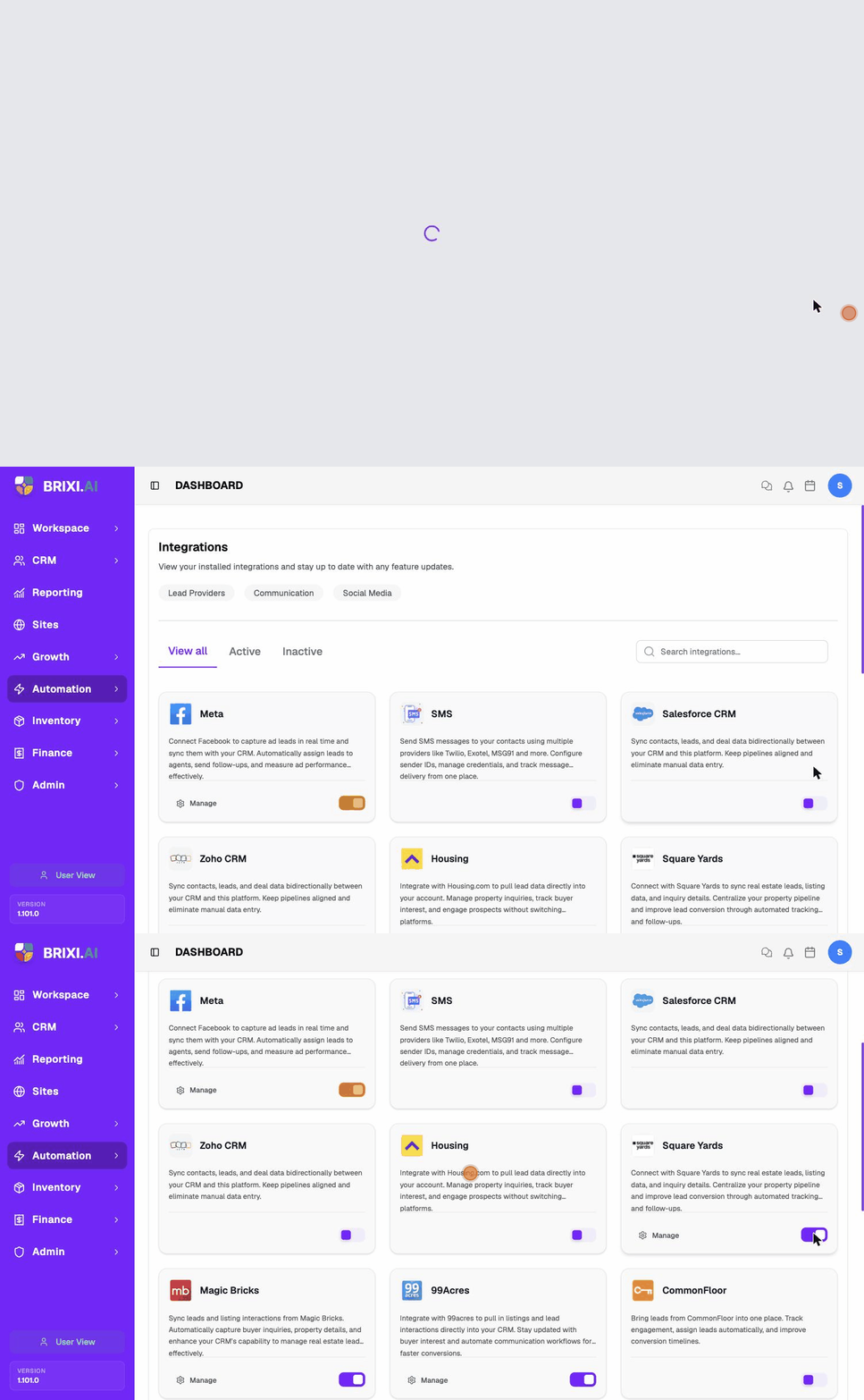
Installing is quick — once the toggle is on and Manage appears, Brixi has generated a unique webhook URL for your account.
Step 2 — Copy Your Webhook URL
Open Manage on the Square Yards card. The integration page shows a ready-to-send message that includes your unique Webhook URL and a link to the Brixi API documentation. Click the copy icon to copy the full message.
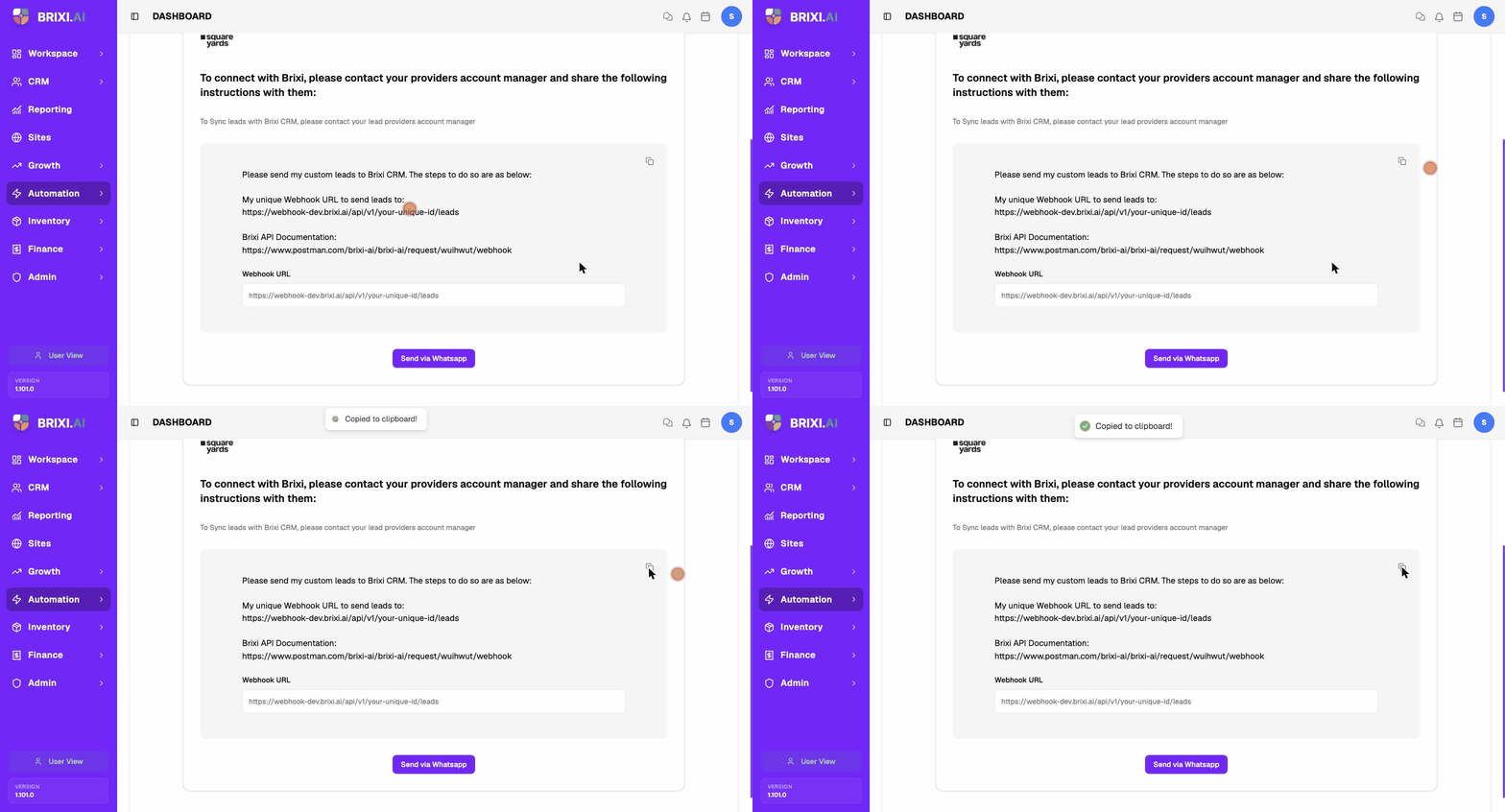
Your webhook URL looks like this, with a unique ID for your account:
https://webhook.brixi.ai/api/v1/your-unique-id/leads
Anyone with this URL can post leads into your CRM. Only share it with your Square Yards account manager.
Step 3 — Send the Details to Square Yards
Square Yards sets up delivery from their side, so hand them the webhook URL. From the Manage screen you can:
- Send via WhatsApp — opens WhatsApp with the instructions and webhook URL ready to send.
- Copy the message and email or message it to your Square Yards account manager.
Ask Square Yards to set up a PUSH integration that delivers your leads to the webhook URL.
After Connecting
After Square Yards starts delivering to the webhook, every inquiry appears as a contact in CRM → Contacts with Square Yards as the source. Get them to send a test lead, then confirm the details landed and your assignment and follow-up workflows ran.
Common Issues
| Issue | What to check |
|---|---|
| Leads are not appearing | Confirm Square Yards is sending to the exact webhook URL and that the integration is still active. Ask them to resend a test lead. |
| Leads are duplicated | Review duplicate matching by phone or email. The same inquiry sent twice can create duplicates. |
| Lead has no owner | Add a lead distribution policy or default owner so new Square Yards leads route automatically. |
| Wrong source on contacts | Confirm the lead is arriving through the Square Yards webhook, not another connected source. |
| Webhook URL was shared by mistake | Reinstall the integration to generate a fresh URL, then re-send it to Square Yards. |
Your admin can rule out the Brixi side quickly: the connector should still be toggled on, and the webhook URL on the Manage screen should match what Square Yards has on file. If those check out, the gap is almost always on the delivery side — push your Square Yards account manager to confirm the PUSH integration is actually live.
If Square Yards confirms leads are being pushed to the right URL and contacts still aren't created, contact Brixi support. Include when the test lead went out and the phone or email it used so the delivery can be traced.